AggV3 code book - identifying the correct subshard
For any query using AggV3, you must first identify the correct subshard for your genomic region of interest.
There are two ways to identify the relevant subshards for your analysis:
- You can use the shard lookup tool to pull out the shards by inputting a locus.
- Query the shard BED files with bedtools.
Shard BED files
We provide shard BED files for different purposes listing the subshard names and full file paths to the VCF files. You can find these at:
- Multiallelic genotype VCFs,
s3://512426816668-gel-data-resources/dragen3.7.8/AggV3_resources/manifests/genomic_data/multiallelic_shards.bed - Biallelic genotype VCFs,
s3://512426816668-gel-data-resources/dragen3.7.8/AggV3_resources/manifests/genomic_data/biallelic_shards.bed - Biallelic genotype PGEN files,
s3://512426816668-gel-data-resources/dragen3.7.8/AggV3_resources/manifests/genomic_data/pgen_shards.bed - Aggregation sites VCFs,
s3://512426816668-gel-data-resources/dragen3.7.8/AggV3_resources/manifests/genomic_data/sites_shards.bed - Functional annotation VCFs,
s3://512426816668-gel-data-resources/dragen3.7.8/AggV3_resources/manifests/functional_annotation/2025-12-24/functional_annotation_shards.bed - Quality control VCFs,
s3://512426816668-gel-data-resources/dragen3.7.8/AggV3_resources/manifests/site_qc/2026-01-06/siteqc_shards.bed
The shard BEDs file contains one line for each of the 3,166 subshards. The exact fields depend on the BED file you're using:
| Description | Example |
|---|---|
| chromosome | chr1 |
| subshard start position, 0-based (as it appears in the Illumina files MINUS 1) | 10060 |
| subshard end position | 1111562 |
| chr:start-end | chr1:10061-1111562 |
| shard | 1 |
| subshard | 1 |
| full path to the multiallelic vcf | s3://357851407625-germline-aggregate-v3/data/euw2-dragen-igg-20250430075006-msvcf-version-1/data/shard-msvcf/shard-1/subshard-1/dragen.vcf.gz |
| full path to the multiallelic vcf index | s3://357851407625-germline-aggregate-v3/data/euw2-dragen-igg-20250430075006-msvcf-version-1/data/shard-msvcf/shard-1/subshard-1/dragen.vcf.gz.tbi |
| Description | Example |
|---|---|
| chromosome | chr1 |
| subshard start position, 0-based (as it appears in the Illumina files MINUS 1) | 10060 |
| subshard end position | 1111562 |
| chr:start-end | chr1:10061-1111562 |
| shard | 1 |
| subshard | 1 |
| full path to the biallelic vcf | s3://357851407625-germline-aggregate-v3/data/euw2-dragen-igg-20250430075006-msvcf-version-1/shard-1/subshard-1/postproc/vcf/dragen.vcf.gz |
| full path to the biallelic vcf index | s3://357851407625-germline-aggregate-v3/data/euw2-dragen-igg-20250430075006-msvcf-version-1/shard-1/subshard-1/postproc/vcf/dragen.vcf.gz.tbi |
| Description | Example |
|---|---|
| chromosome | chr1 |
| subshard start position, 0-based (as it appears in the Illumina files MINUS 1) | 10060 |
| subshard end position | 1111562 |
| chr:start-end | chr1:10061-1111562 |
| shard | 1 |
| subshard | 1 |
| full path to the PGEN file | s3://357851407625-germline-aggregate-v3/data/euw2-dragen-igg-20250430075006-msvcf-version-1/shard-1/subshard-1/postproc/pgen/dragen.pgen |
| full path to the PVAR file | s3://357851407625-germline-aggregate-v3/data/euw2-dragen-igg-20250430075006-msvcf-version-1/shard-1/subshard-1/postproc/pgen/dragen.pvar |
| full path to the PSAM file | s3://357851407625-germline-aggregate-v3/data/euw2-dragen-igg-20250430075006-msvcf-version-1/shard-1/subshard-1/postproc/pgen/dragen.psam |
| Description | Example |
|---|---|
| chromosome | chr1 |
| subshard start position, 0-based (as it appears in the Illumina files MINUS 1) | 10060 |
| subshard end position | 1111562 |
| chr:start-end | chr1:10061-1111562 |
| shard | 1 |
| subshard | 1 |
| full path to the vcf | s3://357851407625-germline-aggregate-v3/data/euw2-dragen-igg-20250430075006-msvcf-version-1/shard-1/subshard-1/postproc/vcf/dragen_sites.vcf.gz |
| full path to the vcf index | s3://357851407625-germline-aggregate-v3/data/euw2-dragen-igg-20250430075006-msvcf-version-1/shard-1/subshard-1/postproc/vcf/dragen_sites.vcf.gz.tbi |
| Description | Example |
|---|---|
| chromosome | chr1 |
| subshard start position, 0-based (as it appears in the Illumina files MINUS 1) | 10060 |
| subshard end position | 1111562 |
| chr:start-end | chr1:10061-1111562 |
| shard | 1 |
| subshard | 1 |
| full path to the biallelic functional annotation vcf | s3://357851407625-germline-aggregate-v3-supporting-data/functional-annotation_2025-12-24/shard-1/subshard-1/dragen.gel.annotated.vcf.gz |
| full path to the biallelic functional annotation vcf index | s3://357851407625-germline-aggregate-v3-supporting-data/functional-annotation_2025-12-24/shard-1/subshard-1/dragen.gel.annotated.vcf.gz.tbi |
| Description | Example |
|---|---|
| chromosome | chr1 |
| subshard start position, 0-based (as it appears in the Illumina files MINUS 1) | 10060 |
| subshard end position | 1111562 |
| chr:start-end | chr1:10061-1111562 |
| shard | 1 |
| subshard | 1 |
| full path to the siteQC vcf | s3://357851407625-germline-aggregate-v3-supporting-data/base-site-qc_2026-01-06/shard-1/subshard-1/dragen.gel.siteqc.vcf.gz |
| full path to the siteQC vcf index | s3://357851407625-germline-aggregate-v3-supporting-data/base-site-qc_2026-01-06/shard-1/subshard-1/dragen.gel.siteqc.vcf.gz.tbi |
To find the right subshard file, you will need to:
- Create a BED file of your regions of interest.
- Intersect your BED file against the shard BED file.
Create your own BED file
You firstly must create a regions file of your genes, variants or regions of interest. This must be a three column tab-delimited file of chromosome, start, and stop (with an option fourth column of an identifier - i.e. a gene name). The file should have the .bed extension. There is no limit to how many lines you can have in this file.
Please pre-sort your data by chromosome and then by start position (sort -k1,1 -k2,2n in.bed in.sorted.bed)
Example:
You can create this file within a CloudOS interactive session, or create it elsewhere and upload it to CloudOS.
Intersect the two files
Now you can intersect the bed file of shard names in an interactive session or as a bash script.
- Open an interactive session and mount the BED file to the session.
- Open the command line interface.
-
Load bedtools in the command line interface. The easiest way to do this is using conda:
conda install bedtools
-
Run bedtools intersect:
This will print out a tab-delimited file with the number of lines equalling the number of inputs in the regions file, containing the columns from your bed file, plus the columns from the subshard bed.
Mount the VCF(s) and index(es) to your interactive session
If you're working in an interactive session, you can now work with the subshard by mounting it to your interactive session. You have two options:
- mount the subshard VCF and its index only to your session; this will load more quickly, but may be laborious if you are querying multiple regions.
- mount the entire shard data folder to your session; this approach is more appropriate if you're querying multiple regions but it will take longer to mount all the files.
mounting multiple shard VCFs
All of the shard VCFs of the same type will have the same filename (eg dragen.vcf.gz for the genotype VCFs). This means that if you mount or multiple files directly, they will all appear in mounted-data-readonly or filesystems under the same filename, and the filesystem will not be able to differentiate between them. If you're using multiple shard VCFs, we recommend mounting the parent folders to avoid this.
- Go to Batch analysis and select Run Pipeline.
- Search for bedtools and select a bedtools container
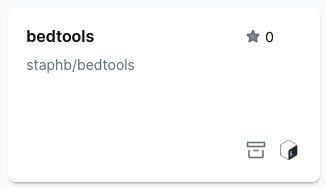
If you cannot find a bedtools container, select Import, then Bash and paste in the path to a bedtools container:
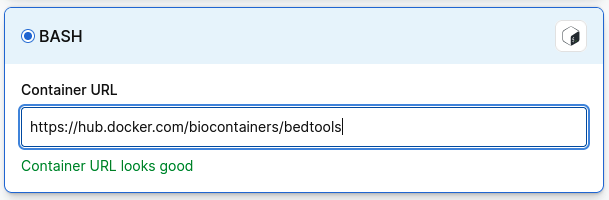
- Select executable script and add
bedtools intersect -wothen add the parameters-ayour bed file and-bthe relevant shard bed file. - Choose your project and run analysis.