Ubuntu upgrade
On 29th March, we updated the RE operating system to Ubuntu. This resulted in a number of changes to the RE.
Appearance and layout
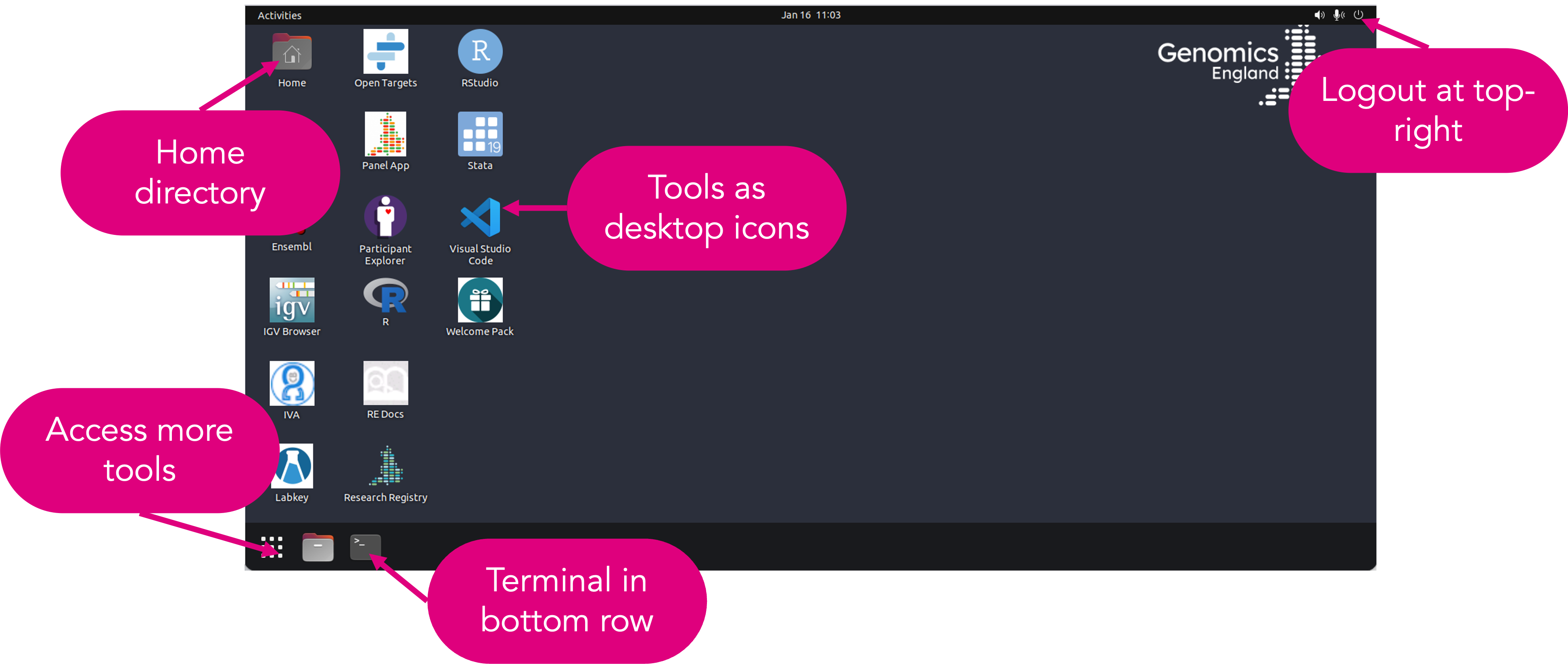
The Ubuntu desktop looks slightly different to the old desktop, however the tools you are used to are all still available. Some of them may only be available in the tools pop-up.
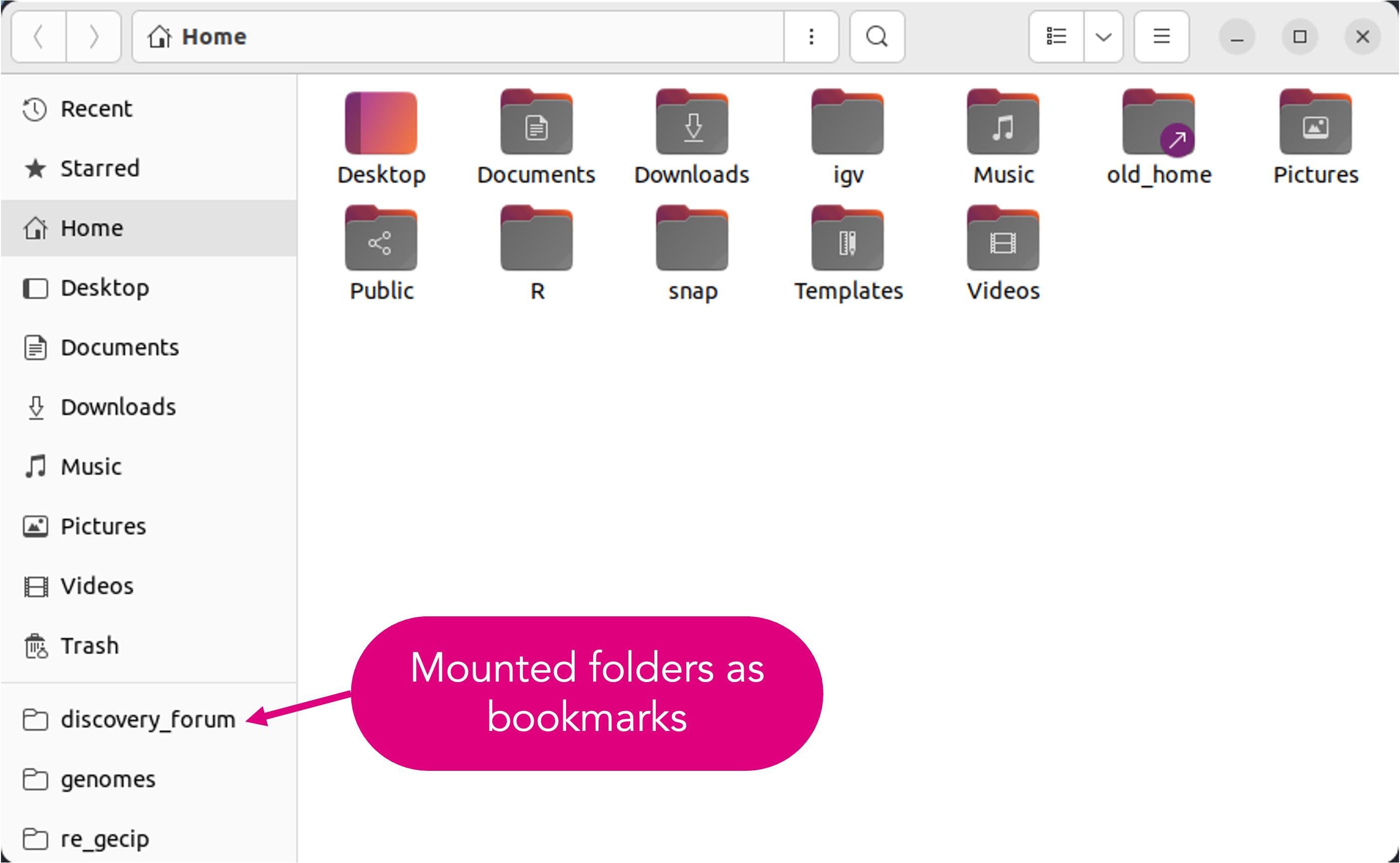
When you open your home directory, you will no longer see the mounted data folders, such as genomes, gel_data_resources or re_gecip, as icons. Instead they are listed as bookmarks in the left-hand panel.
Access to workspace
The login screen to access the workspace looks different. You still use the same username (initial+lastname), password and verification code (your two-factor authentication) as before, however, you will input these on three different screens.
It is possible to access the workspace using an AWS web client. If your main operating system is Ubuntu, this will make access easier for you.
Changes to packages available on the HPC
The upgrade to Ubuntu has caused incompatibilities with a number of software packages installed on the HPC. Many packages that were previously available on the HPC are no longer there, and many are only available in updated versions. We have also taken the opportunity to remove outdated software, for example we no longer have vcftools but bcftools is still available.
You may need to edit your pipelines to use the latest modules.
Packages no longer installed on the HPC
The following packages are no longer installed on the HPC:
AdapterRemoval
ampliconArchitect
ampliconClassifier
annotSV
apbs
asmc-asmc
AutoDock_Vina
automake
aws-cli
bedops
BerkeleyDB
Bio-DB-HTS
blast+
bolt-lmm
bowtie2
BWA
CADD
canvas
CaVEMan
circos
clang
CNView
CNVnator
cpan
cython
cytoscape
delly
denovoGear
discover
dotnet
drop
fastqc
ffmpeg
fribidi
gauchian
gcta
gistic
gnu-parallel
gnu
gradle
guppy
gvcfgenotyper
hisat2
homer
igv
imagemagick
kallisto
lapack
ldsc
ldstore
libunwind
liftover
linasm
llvm
lollipop
lumpy
mafft
manta
matlab
MEDICC2
meme
metal
miniconda3
miniforge3
minimap2
mosaicHunter
mplayer
msisensor-pro
msisensor
multiqc
music2
mutserve
mutsig2cv
new_fugue
nodejs
pandoc
pindel
platypus
plink_seq
popdel
prsice-2
pycircos
pysam
readline
repeatDetector
rvtests
saige
salmon
shapeit4
somalier
squirls
stack
star
superSTR
svanna
tabix
trimmomatic
udunits
vcf2maf
vcfanno
vcflib
vcftools
verifyBamID
vt
xz
zlib
zulu
Packages new to Ubuntu
The following packages are new to Ubuntu:
Package version changes
The following packages are available in the existing HPC and the upgraded Ubuntu HPC, but the packages may have been updated:
| Package | Upgraded ubuntu HPC | Current linux HPC |
|---|---|---|
aliview |
aliview/1.28 |
aliview/1.28 |
annovar |
annovar/2019Nov, annovar/2024-03-14 |
annovar/2019Nov, annovar/2024-03-14 |
ant |
ant/1.9.16 |
ant/1.9.16 |
bamtools |
bamtools/2.5.2 |
bamtools/2.5.2 |
bcftools |
bcftools/1.16, bcftools/1.21 |
bcftools/1.16 |
beagle |
beagle/5.4 |
beagle/5.4 |
bedtools |
bedtools/2.30.0, bedtools/2.31.1 |
bedtools/2.30.0, bedtools/2.31.0 |
blat |
blat/1.0 |
blat/1.0 |
boost |
boost/1.83, boost/1.84 |
boost/1.83 |
cmake |
cmake/3.24.0, cmake/ECM |
cmake/3.24.3 |
cromwell |
cromwell/v65 |
cromwell/v65 |
curl |
curl/7.81.0 |
curl/7.81.0 |
eigen |
eigen/3.3.9 |
eigen/3.3.9 |
exomiser |
exomiser/13.3.0 |
exomiser/13.3.0 |
exonerate |
exonerate/2.2.0 |
exonerate/2.2.0 |
ExpansionHunter |
ExpansionHunter/5.0.0, |
ExpansionHunter/3.2.2, ExpansionHunter/4.0.2 |
ExpansionHunterDenovo |
ExpansionHunterDenovo/0.9.0 |
ExpansionHunterDenovo/0.9.0 |
fetk |
fetk/1.9.3 |
fetk/1.9.3 |
gatk |
gatk/4.5.0.0 |
gatk/4.5.0.0 |
gcc |
gcc/10.4.0 |
gcc/10.4.0 |
gdal |
gdal/3.7.0 |
gdal/3.7.0 |
geos |
geos/3.12.2 |
geos/3.12.1 |
gmp |
gmp/6.2.1 |
gmp/6.2.1 |
gsl |
gsl/2.7 |
GSL/2.7 |
haplocheck |
haplocheck/1.3.3 |
haplocheck/1.3.3 |
hipstr |
hipstr/0.7 |
hipstr/0.7 |
hla-la |
hla-la/1.0.3 |
hla-la/1.0.3 |
hmftools |
hmftools/2024-02-06 |
hmftools/2024-02-06 |
htslib |
htslib/1.18, htslib/1.21 |
htslib/1.18 |
java |
java/1.8, java/11.0.2, java/17.0.2, java/19.0.2, java/21.0.2, java/23.0.1 |
java/1.8, java/11.0.2, java/17.0.2, java/19.0.2 |
jq |
jq/1.7.1 |
jq/1.7.1 |
king |
king/2.3.2 |
king/2.3.2 |
kraken |
kraken/1.1.1, kraken2/2.1.3 |
kraken/1.1.1, kraken2/2.1.3 |
kraken2 |
kraken2/2.1.3 |
kraken2/2.1.3 |
libdeflate |
libdeflate/1.20 |
libdeflate/1.20 |
libgit2 |
libgit2/1.6.2 |
libgit2/1.6.2 |
libtiff |
libtiff/4.7.0 |
libtiff/3.4, libtiff/4.3.0, libtiff/4.5.0 |
locuszoom |
locuszoom/1.4 |
locuszoom/1.4 |
magma |
magma/1.10 |
magma/1.10 |
maven |
maven/3.9.6 |
maven/3.9.6 |
MPFR |
MPFR/4.2.0 |
MPFR/4.2.0 |
ncurses |
ncurses/6.4 |
ncurses/6.4 |
nextflow |
nextflow/22.10.5, nextflow/23.04, nextflow/23.10, nextflow/23.10-with-plugins, nextflow/24.04.2-with-plugins |
nextflow/22.10.5, nextflow/23.04, nextflow/23.10, nextflow/23.10-with-plugins, nextflow/24.04.2-with-plugins |
nf-core |
nf-core/0.3.1 |
nf-core/0.3.1 |
nf-test |
nf-test/0.7.3, nf-test/0.8.2, nf-test/0.9.0 |
nf-test/0.7.3, nf-test/0.8.2, nf-test/0.9.0 |
openrefine |
openrefine/3.7.4 |
openrefine/3.7.4 |
openssl |
openssl/1.1.1o, openssl/1.1.1t, openssl/3.6.0 |
openssl/1.1.1o |
perl |
perl/5.38.2 |
perl/5.38.2 |
picard |
picard/3.1.1 |
picard/3.1.1 |
plink |
plink/1.9, plink/2.0, plink/2.00a3.3LM |
plink_seq/0.10, plink/1.9, plink/2.0, plink/2.00a3.3LM |
proj |
proj/8.2.1 |
proj/8.2.1 |
python |
python/3.11, python/3.13.9 |
python/3.11, python/3.8, python/3.8.1 |
R |
R/4.3.3, R/4.5.1 |
R/4.2.1, R/4.3.3 |
regenie |
regenie/3.4.1 |
regenie/3.4.1 |
REViewer |
REViewer/0.2.7 |
REViewer/0.2.7 |
rtg-tools |
rtg-tools/3.12.1 |
rtg-tools/3.12.1 |
samtools |
samtools/1.16.1, samtools/1.21 |
samtools/1.16.1 |
singularity |
singularity/3.8.3, singularity/4.1.1, singularity/4.1.1-test3 |
singularity/3.8.3, singularity/4.1.1 |
sniffles |
sniffles/1.0.11 |
sniffles/1.0.11 |
sqlite3 |
sqlite3/3.38.1 |
sqlite3/3.40.0 |
strelka |
strelka/2.9.10 |
strelka/2.9.10 |
tabix |
tabix/1.21 |
tabix/1.18 |
udunits |
udunits/2.2.28 |
udunits/2.2.28 |
xz |
xz/5.4.7 |
xz/5.4.7 |
zlib |
zlib/1.3 |
zlib/1.3 |
If there is a package you need to use that is not available, we recommend that you use containers to access it. Many bioinformatics containers are available from biocontainers.
R version upgrade
We will be removing older versions of R which are not compatible with Ubuntu, with only R/4.3.3 and R/4.5.2 now available.
To use R pre-installed packages, you will need to re-add the library to your .libPaths in your R session.
If you are using R packages which are not compatible with these versions of R, we recommend using Rocker containers for R packages. We provide a tutorial on working with Rocker.